

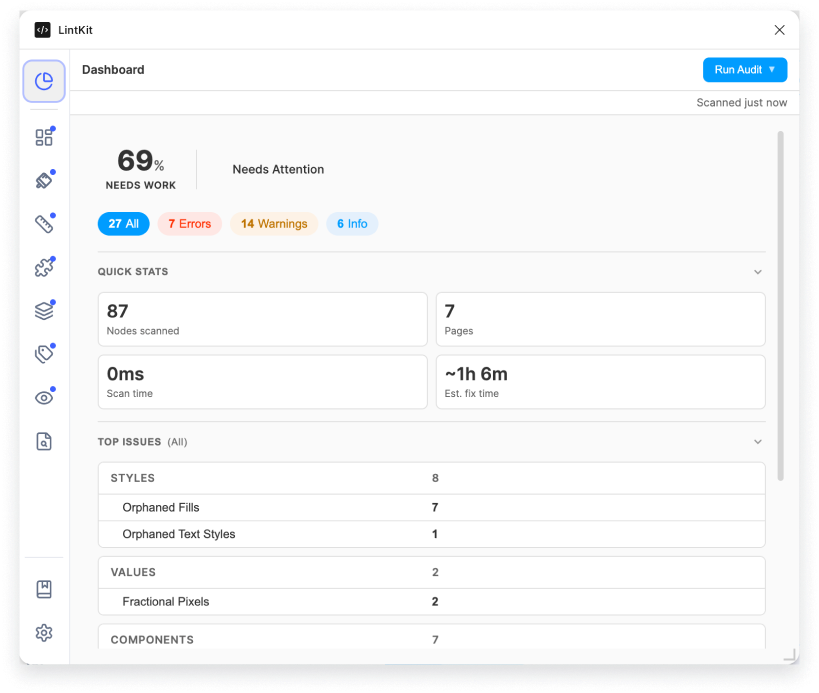
How the score works
The compliance score measures the percentage of nodes in your file that have no findings:Worked example
Suppose you scan a file and LintKit reports:
The compliance score is:
Rating thresholds
Handoff status
The handoff status tells you whether a file is safe to hand to developers. It considers only errors and warnings because info-level findings are cosmetic.What to do with each rating
1
Excellent (95+)
Skim the remaining findings. Most are likely info-level. Fix any that affect handoff clarity, then ship.
2
Good (80-94)
Filter findings by error severity first and resolve those. Then work through warnings. You can usually reach Excellent in one session.
3
Needs work (50-79)
Sort by severity. Fix all errors first since they block handoff. Use the category tabs (Styles, Values, Components) to batch similar findings. If you have Pro, Bulk Fix can handle groups of orphaned styles or fractional pixels quickly.
4
Critical (below 50)
Start with the highest-count findings on the Overview tab. Orphaned fills and orphaned text are usually the biggest contributors. Address the top 3-4 finding types and rescan. You should see a significant score jump after each pass.
Estimated fix time
LintKit estimates how long it will take to resolve all findings based on severity:
The formula is:
Quick stats
After each scan, the dashboard displays:- Total nodes scanned
- Total findings
- Breakdown by severity (error, warning, info)
- Estimated fix time
- Handoff status badge