> ## Documentation Index
> Fetch the complete documentation index at: https://docs.lintkit.com/llms.txt
> Use this file to discover all available pages before exploring further.
# Style rules
> Detect orphaned, duplicate, and unused styles
Style rules catch layers that have drifted away from your design system. When a fill, stroke, text style, or effect is not connected to a shared style or variable, it becomes an orphan -- a hardcoded value that will not update when your design system changes. These are typically the most common findings in any file.
## Why orphaned styles matter
Orphaned styles cause three recurring problems:
1. **Handoff drift.** Developers see a hex color like `#2563EA` instead of a semantic token like `primary/500`. They hardcode the hex, and when your brand color changes, their code does not update.
2. **Maintenance cost.** When you update `primary/500` from blue to indigo, orphaned layers keep the old blue. You have to find and fix each one manually.
3. **Inconsistency.** Two designers on the same file might use slightly different blues (`#2563EB` vs `#2563EA`). Without style connections, there is no single source of truth.
***
## Orphaned Fills
**Default:** On | **Severity:** `warn`
Detects solid fills that are not linked to a paint style or color variable. If 47 layers share the same orphaned blue, they appear as a single grouped finding rather than 47 separate ones.
### What it detects
Imagine you draw a rectangle and set its fill to `#2563EB` by typing the hex code directly. That fill is now orphaned -- it is not connected to any style or variable. If your team later changes `Brand/Primary` from `#2563EB` to `#4F46E5`, this rectangle stays blue while everything else turns indigo.
LintKit groups all nodes sharing the same color (by RGB + opacity) into a single finding. For example:
> **12 layers** use fill color `#2563EB` (opacity 100%) without a linked style.
> Closest match: **Brand/Primary** (Delta E: 0.3)
### When to enable it
Enable this rule (it is on by default) whenever your file uses paint styles or color variables. Disable it only if you are working on an early exploration file where styles have not been defined yet.
### How to fix findings
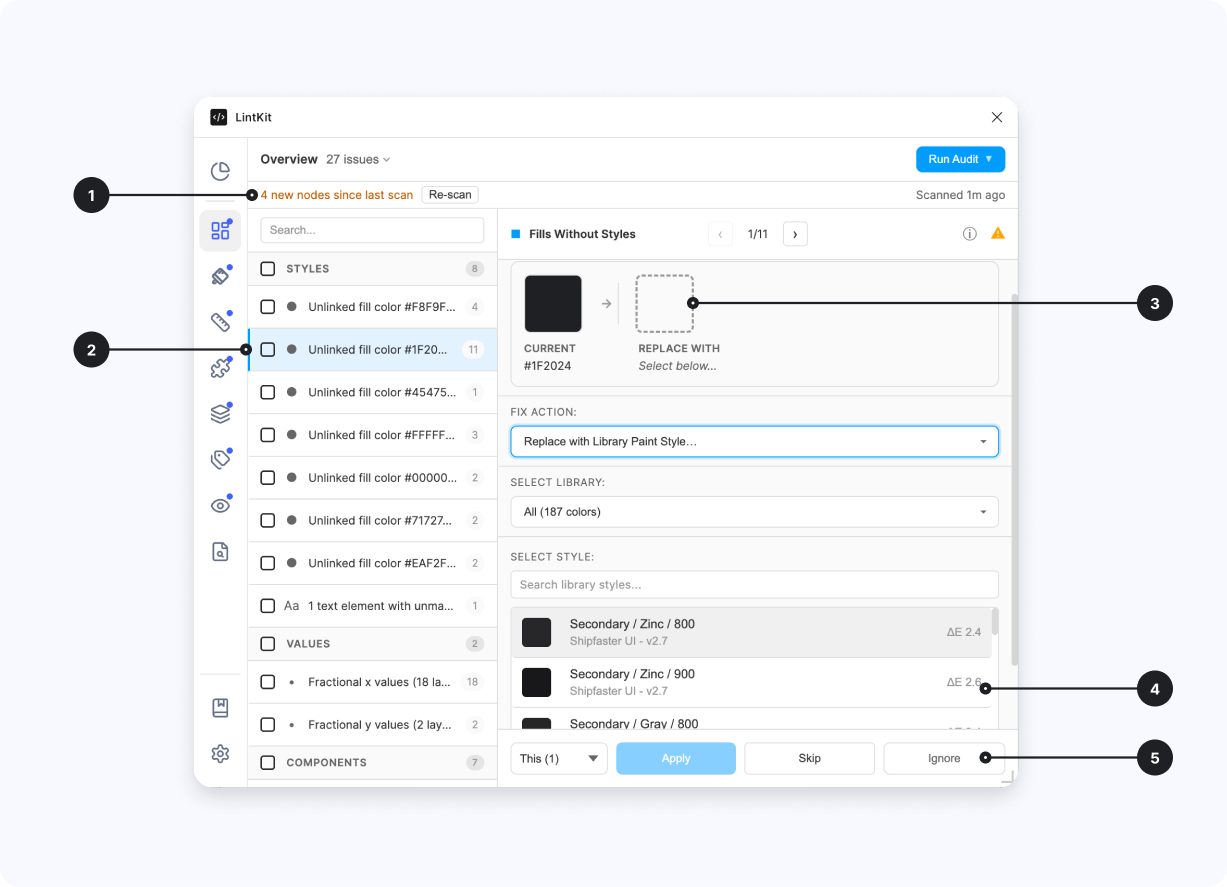 1. **Staleness indicator** — when new nodes are found, LintKit automatically shows how many and gives the option to rescan.
2. **Finding list item** — the grouped finding in the Overview section showing the orphaned fill color and affected node count.
3. **Color preview** — shows the selected color, the hex value, and a preview of the suggested replacement color.
4. **Match distance** — shows how close the suggested library color is to the orphaned fill color (using Delta E perceptual distance).
5. **Scope selector** — fix just this instance or all instances. You can also skip and come back to it in the next scan, or ignore it completely.
Click the finding to see all affected layers. Click any layer name to select it on the canvas.
LintKit offers several options depending on what matches exist:
* **Link to existing style** -- if a matching paint style is found, click **Apply Fix** to connect all layers to that style.
* **Bind to variable** -- if you use color variables, bind the layers to the appropriate variable instead.
* **Smart Replace** -- LintKit suggests the closest match from your library using Delta E 2000 perceptual color distance. A Delta E below 1.0 is an exact match; below 3.0 is virtually indistinguishable.
* **Create new style** -- if no match exists, create a new paint style from the detected color.
After applying, re-scan to confirm the finding is resolved. If the color was slightly off from the matched style, verify visually that the replacement looks correct.
### Configuration
| Key | Default | Description |
| ---------------- | ------- | -------------------------------------------------------------------------------------------------------------------------------- |
| `colorTolerance` | `5` | Maximum Delta E 2000 distance for suggesting a matching style. Increase to see more suggestions; decrease for stricter matching. |
### Edge cases
* **Variable-bound fills** are skipped. If a fill is already bound to a color variable, it is connected to your system and will not be flagged.
* **Layers inside component instances** are skipped. Instance internals are controlled by the main component -- fix the main component instead.
* **Tokens Studio strict mode** suppresses findings when a fill color matches a token. In strict mode, LintKit treats token matches as compliant even without a Figma style connection. In advisory mode, the finding still appears but includes token metadata.
***
## Orphaned Text
**Default:** On | **Severity:** `warn`
Detects text nodes that do not use a text style. LintKit matches text by **font family** and **font size** to suggest the correct style.
### What it detects
A text node using Inter at 16px without a linked text style would produce:
> **8 text layers** use Inter / Regular / 16px without a linked text style.
> Matching style found: **Body/Default**
### When to enable it
Enable this rule whenever your file has text styles defined. Disable it only during early typography exploration before styles are established.
### How to fix findings
When LintKit finds a text style matching the same font family and size, it suggests linking to that style. Verify the match includes the correct weight and other properties.
* If a match is found, click **Apply Fix** to link all affected text layers to the style.
* If no match exists (the finding says "no matching style"), you need to create the text style manually in Figma first, then re-scan.
### Edge cases
* **Mixed-font text nodes** (a single text layer with multiple font families or sizes applied to different characters) are skipped because there is no single style that can represent the mixed formatting.
***
## Orphaned Strokes
**Default:** On | **Severity:** `warn`
Detects strokes that are not linked to a paint style or color variable. Uses the same color grouping and Delta E 2000 matching as Orphaned Fills.
### What it detects
Any solid stroke color that is not connected to a style or variable. For example:
> **5 layers** use stroke color `#E5E7EB` (opacity 100%) without a linked style.
> Closest match: **Border/Default** (Delta E: 1.2)
### When to enable it
Enable whenever you use paint styles or variables for border colors. This is on by default because orphaned strokes cause the same handoff and maintenance problems as orphaned fills.
### How to fix findings
The fix workflow is identical to Orphaned Fills: link to an existing paint style, bind to a color variable, use Smart Replace, or create a new style.
### Configuration
| Key | Default | Description |
| ---------------- | ------- | ------------------------------------------------------------------------------------- |
| `colorTolerance` | `5` | Maximum Delta E distance for suggesting a matching style. Shared with Orphaned Fills. |
### Edge cases
* **Variable-bound strokes** are skipped.
* **Layers inside component instances** are skipped.
* **Tokens Studio strict mode** suppresses matching colors, identical to Orphaned Fills behavior.
***
## Orphaned Effects
**Default:** On | **Severity:** `warn`
Detects effects (drop shadows, inner shadows, layer blurs, background blurs) that are not connected to an effect style.
### What it detects
Any visible effect that is not linked to an effect style. LintKit creates a signature from the first visible effect (type, color, offset, radius, spread for shadows; type + radius for blurs) and looks for a matching local style. For example:
> **3 layers** use a drop shadow (0, 4, 8, #00000040) without an effect style.
> Matching style found: **Shadow/Medium**
### When to enable it
Enable whenever your file uses effect styles for shadows and blurs. This is on by default.
### How to fix findings
If LintKit finds a matching effect style, review that the style properties (offset, blur, spread, color) match what you intend.
* Click **Apply Fix** to link to the matching effect style.
* If no match is found, create an effect style manually in Figma and re-scan.
### Edge cases
* **Only the first visible effect** is used for signature matching. If a node has multiple stacked effects (for example, a drop shadow and an inner shadow), only the first visible one is compared. This means a multi-effect node might not match a multi-effect style even if the effects are identical.
* **Invisible effects** (visibility toggled off) are ignored entirely.
* **Effects bound to variables** are skipped.
***
## Orphaned Grids
**Default:** On | **Severity:** `info`
Detects layout grids on frames, components, and component sets that are not linked to a grid style.
### What it detects
Any visible layout grid that exists without a grid style connection. For example:
> **2 frames** use a 12-column grid (margin: 24, gutter: 16) without a grid style.
> Matching style found: **Grid/Desktop-12col**
### When to enable it
Enable if your team uses grid styles to standardize layout grids across files. This rule is `info` severity by default because layout grids are less commonly tokenized than colors or text.
### How to fix findings
Click **Apply Fix** to link the frame's grid to the matching grid style. If no match is found, create a grid style in Figma first.
### Edge cases
* **Only the first visible grid** is checked for matching. Frames with multiple grids may not match a multi-grid style.
* **Invisible grids** are ignored.
* **Grids bound to variables** are skipped.
***
## Duplicate Styles
**Default:** Off | **Severity:** `warn`
Detects near-identical local styles that could be consolidated. Instead of comparing hex codes directly, LintKit converts colors to the CIE Lab color space and uses the **Delta E 2000** perceptual distance metric, which matches how humans perceive color differences.
### What it detects
Styles that are visually indistinguishable or nearly so. For example:
> **Duplicate paint styles found:** `Brand/Primary` (#2563EB) and `Legacy/Blue` (#2462EA) are perceptually identical (Delta E: 0.8).
> Recommendation: merge into `Brand/Primary`.
1. **Staleness indicator** — when new nodes are found, LintKit automatically shows how many and gives the option to rescan.
2. **Finding list item** — the grouped finding in the Overview section showing the orphaned fill color and affected node count.
3. **Color preview** — shows the selected color, the hex value, and a preview of the suggested replacement color.
4. **Match distance** — shows how close the suggested library color is to the orphaned fill color (using Delta E perceptual distance).
5. **Scope selector** — fix just this instance or all instances. You can also skip and come back to it in the next scan, or ignore it completely.
Click the finding to see all affected layers. Click any layer name to select it on the canvas.
LintKit offers several options depending on what matches exist:
* **Link to existing style** -- if a matching paint style is found, click **Apply Fix** to connect all layers to that style.
* **Bind to variable** -- if you use color variables, bind the layers to the appropriate variable instead.
* **Smart Replace** -- LintKit suggests the closest match from your library using Delta E 2000 perceptual color distance. A Delta E below 1.0 is an exact match; below 3.0 is virtually indistinguishable.
* **Create new style** -- if no match exists, create a new paint style from the detected color.
After applying, re-scan to confirm the finding is resolved. If the color was slightly off from the matched style, verify visually that the replacement looks correct.
### Configuration
| Key | Default | Description |
| ---------------- | ------- | -------------------------------------------------------------------------------------------------------------------------------- |
| `colorTolerance` | `5` | Maximum Delta E 2000 distance for suggesting a matching style. Increase to see more suggestions; decrease for stricter matching. |
### Edge cases
* **Variable-bound fills** are skipped. If a fill is already bound to a color variable, it is connected to your system and will not be flagged.
* **Layers inside component instances** are skipped. Instance internals are controlled by the main component -- fix the main component instead.
* **Tokens Studio strict mode** suppresses findings when a fill color matches a token. In strict mode, LintKit treats token matches as compliant even without a Figma style connection. In advisory mode, the finding still appears but includes token metadata.
***
## Orphaned Text
**Default:** On | **Severity:** `warn`
Detects text nodes that do not use a text style. LintKit matches text by **font family** and **font size** to suggest the correct style.
### What it detects
A text node using Inter at 16px without a linked text style would produce:
> **8 text layers** use Inter / Regular / 16px without a linked text style.
> Matching style found: **Body/Default**
### When to enable it
Enable this rule whenever your file has text styles defined. Disable it only during early typography exploration before styles are established.
### How to fix findings
When LintKit finds a text style matching the same font family and size, it suggests linking to that style. Verify the match includes the correct weight and other properties.
* If a match is found, click **Apply Fix** to link all affected text layers to the style.
* If no match exists (the finding says "no matching style"), you need to create the text style manually in Figma first, then re-scan.
### Edge cases
* **Mixed-font text nodes** (a single text layer with multiple font families or sizes applied to different characters) are skipped because there is no single style that can represent the mixed formatting.
***
## Orphaned Strokes
**Default:** On | **Severity:** `warn`
Detects strokes that are not linked to a paint style or color variable. Uses the same color grouping and Delta E 2000 matching as Orphaned Fills.
### What it detects
Any solid stroke color that is not connected to a style or variable. For example:
> **5 layers** use stroke color `#E5E7EB` (opacity 100%) without a linked style.
> Closest match: **Border/Default** (Delta E: 1.2)
### When to enable it
Enable whenever you use paint styles or variables for border colors. This is on by default because orphaned strokes cause the same handoff and maintenance problems as orphaned fills.
### How to fix findings
The fix workflow is identical to Orphaned Fills: link to an existing paint style, bind to a color variable, use Smart Replace, or create a new style.
### Configuration
| Key | Default | Description |
| ---------------- | ------- | ------------------------------------------------------------------------------------- |
| `colorTolerance` | `5` | Maximum Delta E distance for suggesting a matching style. Shared with Orphaned Fills. |
### Edge cases
* **Variable-bound strokes** are skipped.
* **Layers inside component instances** are skipped.
* **Tokens Studio strict mode** suppresses matching colors, identical to Orphaned Fills behavior.
***
## Orphaned Effects
**Default:** On | **Severity:** `warn`
Detects effects (drop shadows, inner shadows, layer blurs, background blurs) that are not connected to an effect style.
### What it detects
Any visible effect that is not linked to an effect style. LintKit creates a signature from the first visible effect (type, color, offset, radius, spread for shadows; type + radius for blurs) and looks for a matching local style. For example:
> **3 layers** use a drop shadow (0, 4, 8, #00000040) without an effect style.
> Matching style found: **Shadow/Medium**
### When to enable it
Enable whenever your file uses effect styles for shadows and blurs. This is on by default.
### How to fix findings
If LintKit finds a matching effect style, review that the style properties (offset, blur, spread, color) match what you intend.
* Click **Apply Fix** to link to the matching effect style.
* If no match is found, create an effect style manually in Figma and re-scan.
### Edge cases
* **Only the first visible effect** is used for signature matching. If a node has multiple stacked effects (for example, a drop shadow and an inner shadow), only the first visible one is compared. This means a multi-effect node might not match a multi-effect style even if the effects are identical.
* **Invisible effects** (visibility toggled off) are ignored entirely.
* **Effects bound to variables** are skipped.
***
## Orphaned Grids
**Default:** On | **Severity:** `info`
Detects layout grids on frames, components, and component sets that are not linked to a grid style.
### What it detects
Any visible layout grid that exists without a grid style connection. For example:
> **2 frames** use a 12-column grid (margin: 24, gutter: 16) without a grid style.
> Matching style found: **Grid/Desktop-12col**
### When to enable it
Enable if your team uses grid styles to standardize layout grids across files. This rule is `info` severity by default because layout grids are less commonly tokenized than colors or text.
### How to fix findings
Click **Apply Fix** to link the frame's grid to the matching grid style. If no match is found, create a grid style in Figma first.
### Edge cases
* **Only the first visible grid** is checked for matching. Frames with multiple grids may not match a multi-grid style.
* **Invisible grids** are ignored.
* **Grids bound to variables** are skipped.
***
## Duplicate Styles
**Default:** Off | **Severity:** `warn`
Detects near-identical local styles that could be consolidated. Instead of comparing hex codes directly, LintKit converts colors to the CIE Lab color space and uses the **Delta E 2000** perceptual distance metric, which matches how humans perceive color differences.
### What it detects
Styles that are visually indistinguishable or nearly so. For example:
> **Duplicate paint styles found:** `Brand/Primary` (#2563EB) and `Legacy/Blue` (#2462EA) are perceptually identical (Delta E: 0.8).
> Recommendation: merge into `Brand/Primary`.
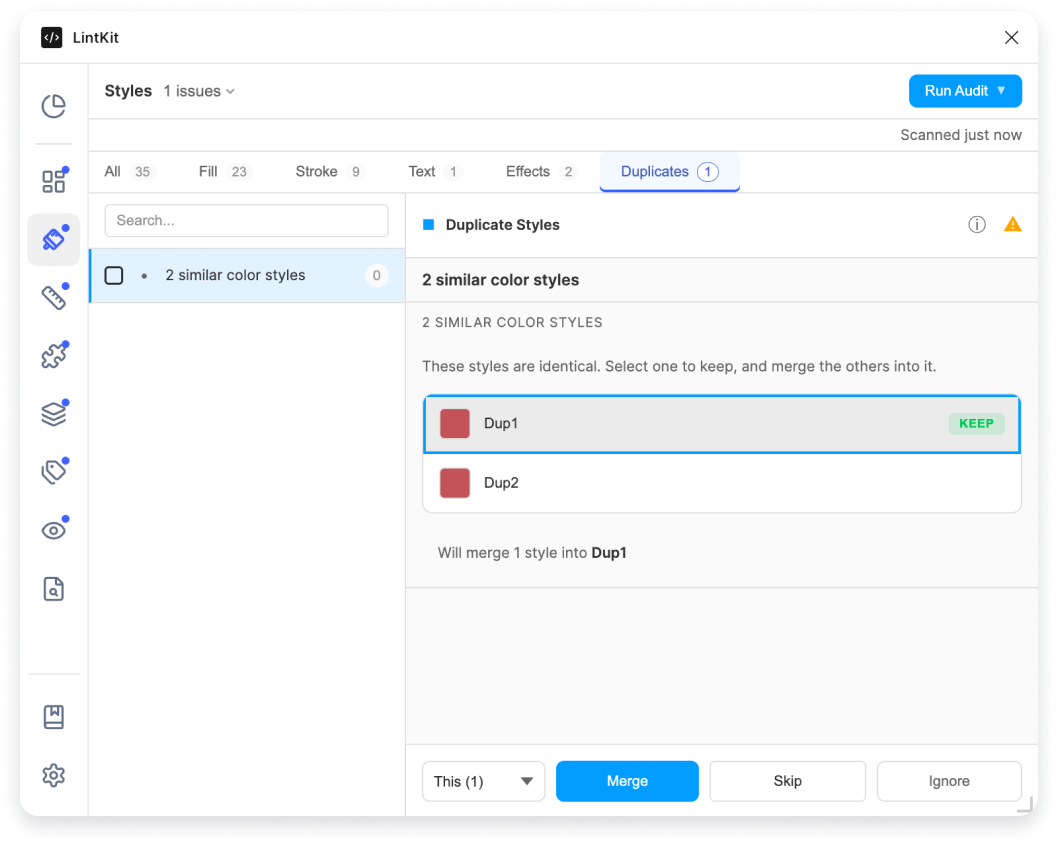 A Delta E of 2.0 means two colors are virtually indistinguishable to the human eye. The default threshold of 2 catches only near-duplicates that almost certainly should be merged.
### When to enable it
Enable this rule when you suspect your file or library has accumulated redundant styles over time -- for example, after a rebrand, a library migration, or when multiple designers have created styles independently. Keep it off during normal work to avoid noise.
### How to fix findings
LintKit groups duplicate styles into clusters. Review each cluster to confirm the styles are truly redundant and not intentionally distinct (for example, `text/primary` and `text/secondary` that happen to be similar).
LintKit keeps the first style in the cluster and remaps all usages of the others to it. If you want a different style to be the canonical one, reorder in Figma first.
Click **Apply Fix** to merge the cluster. All nodes using the removed styles are automatically remapped to the kept style.
### Semantic category grouping
Paint styles are only compared within the same **semantic category**. The category is the first segment of the style name path (everything before the first `/`).
For example:
* `text/primary` and `text/secondary` share the `text` category and **will** be compared
* `text/primary` and `icon/primary` are in different categories and **will not** be compared, even if they use the exact same color
This prevents false positives where two styles intentionally use the same color for different semantic purposes. Styles without a category (no `/` in the name) only match other uncategorized styles.
### Configuration
| Key | Default | Description | Use case for adjusting |
| ----------------------------------- | ------- | -------------------------------------------- | ----------------------------------------------------------------------------------------------------------------- |
| `duplicateStyles.colorThreshold` | `2` | Delta E threshold for paint style comparison | Increase to 4-5 to catch styles that are similar but not identical. Decrease to 1 if you only want exact matches. |
| `duplicateStyles.checkPaintStyles` | `true` | Compare paint styles | Disable if you only want to check text or effect styles |
| `duplicateStyles.checkTextStyles` | `true` | Compare text styles | Text styles use exact matching (family, size, weight, spacing, line height, case, decoration) |
| `duplicateStyles.checkEffectStyles` | `true` | Compare effect styles | Effect styles use exact matching on the full effect signature |
The `colorThreshold` for duplicate styles (default: `2`) is separate from `colorTolerance` (default: `5`). The tolerance is used by orphaned fill/stroke rules to suggest the closest matching style. The threshold is used by this rule to detect near-identical styles that should be merged. Keep the threshold lower than the tolerance to avoid merging styles that are merely similar.
***
## Unused Styles
**Default:** On | **Severity:** `info`
This rule only produces findings in library files. [Learn more about library-only rules.](/features/pricing)
Detects local paint, text, effect, and grid styles that have zero usage on the current page. This helps library maintainers identify styles that can be deprecated or removed.
### What it detects
Any local style (paint, text, effect, or grid) that is not applied to a single node on the current page. For example:
> **Unused paint style:** `Legacy/OldBlue` has zero usages on this page.
### When to enable it
Enable when you are auditing a library file to clean up unused styles. This is on by default but only runs in library files.
### How to fix findings
The scan checks the **current page only** to keep performance fast. A style that appears unused on the current page may be used on other pages or by consumers of your library in other files. Before deleting, check if the style is referenced elsewhere.
* Click **Apply Fix** to delete the unused style.
* Click **Ignore** if the style is intentionally kept for future use or external consumers.
### Edge cases
* **Current page only.** The scan does not load other pages (to avoid slow multi-page loading). A style may appear unused but be referenced on a different page.
* **External consumers.** This rule cannot check whether other files consume the style. If your library is used by other teams, verify externally before deleting.
* **Library files only.** This rule silently returns zero findings in non-library files, so you do not need to toggle it off.
A Delta E of 2.0 means two colors are virtually indistinguishable to the human eye. The default threshold of 2 catches only near-duplicates that almost certainly should be merged.
### When to enable it
Enable this rule when you suspect your file or library has accumulated redundant styles over time -- for example, after a rebrand, a library migration, or when multiple designers have created styles independently. Keep it off during normal work to avoid noise.
### How to fix findings
LintKit groups duplicate styles into clusters. Review each cluster to confirm the styles are truly redundant and not intentionally distinct (for example, `text/primary` and `text/secondary` that happen to be similar).
LintKit keeps the first style in the cluster and remaps all usages of the others to it. If you want a different style to be the canonical one, reorder in Figma first.
Click **Apply Fix** to merge the cluster. All nodes using the removed styles are automatically remapped to the kept style.
### Semantic category grouping
Paint styles are only compared within the same **semantic category**. The category is the first segment of the style name path (everything before the first `/`).
For example:
* `text/primary` and `text/secondary` share the `text` category and **will** be compared
* `text/primary` and `icon/primary` are in different categories and **will not** be compared, even if they use the exact same color
This prevents false positives where two styles intentionally use the same color for different semantic purposes. Styles without a category (no `/` in the name) only match other uncategorized styles.
### Configuration
| Key | Default | Description | Use case for adjusting |
| ----------------------------------- | ------- | -------------------------------------------- | ----------------------------------------------------------------------------------------------------------------- |
| `duplicateStyles.colorThreshold` | `2` | Delta E threshold for paint style comparison | Increase to 4-5 to catch styles that are similar but not identical. Decrease to 1 if you only want exact matches. |
| `duplicateStyles.checkPaintStyles` | `true` | Compare paint styles | Disable if you only want to check text or effect styles |
| `duplicateStyles.checkTextStyles` | `true` | Compare text styles | Text styles use exact matching (family, size, weight, spacing, line height, case, decoration) |
| `duplicateStyles.checkEffectStyles` | `true` | Compare effect styles | Effect styles use exact matching on the full effect signature |
The `colorThreshold` for duplicate styles (default: `2`) is separate from `colorTolerance` (default: `5`). The tolerance is used by orphaned fill/stroke rules to suggest the closest matching style. The threshold is used by this rule to detect near-identical styles that should be merged. Keep the threshold lower than the tolerance to avoid merging styles that are merely similar.
***
## Unused Styles
**Default:** On | **Severity:** `info`
This rule only produces findings in library files. [Learn more about library-only rules.](/features/pricing)
Detects local paint, text, effect, and grid styles that have zero usage on the current page. This helps library maintainers identify styles that can be deprecated or removed.
### What it detects
Any local style (paint, text, effect, or grid) that is not applied to a single node on the current page. For example:
> **Unused paint style:** `Legacy/OldBlue` has zero usages on this page.
### When to enable it
Enable when you are auditing a library file to clean up unused styles. This is on by default but only runs in library files.
### How to fix findings
The scan checks the **current page only** to keep performance fast. A style that appears unused on the current page may be used on other pages or by consumers of your library in other files. Before deleting, check if the style is referenced elsewhere.
* Click **Apply Fix** to delete the unused style.
* Click **Ignore** if the style is intentionally kept for future use or external consumers.
### Edge cases
* **Current page only.** The scan does not load other pages (to avoid slow multi-page loading). A style may appear unused but be referenced on a different page.
* **External consumers.** This rule cannot check whether other files consume the style. If your library is used by other teams, verify externally before deleting.
* **Library files only.** This rule silently returns zero findings in non-library files, so you do not need to toggle it off.