> ## Documentation Index
> Fetch the complete documentation index at: https://docs.lintkit.com/llms.txt
> Use this file to discover all available pages before exploring further.
# Features overview
> All 24 lint rules at a glance -- severity levels, fix confidence, and where to start
LintKit ships with **24 rules** across six categories. Every rule can be toggled on or off in **Settings**, and each finding carries a severity level that tells you how urgently it needs attention.
The `brokenVariables` rule always runs and cannot be toggled off -- broken variable references are too dangerous to ignore.
## Understanding severity levels
Every finding LintKit reports is assigned one of three severity levels. These levels determine sort order, dashboard impact, and handoff readiness.
| Severity | What it means | When you see it |
| -------- | ------------------------------------------------------------------------------- | ---------------------------------------------------------------------- |
| `error` | Something is broken or violates a hard constraint. Fix before handoff. | Broken instances, broken variable references, unapproved library usage |
| `warn` | A likely problem that should be reviewed. Most teams fix these before shipping. | Orphaned styles, contrast failures, off-scale spacing |
| `info` | An observation or suggestion. Safe to defer, but worth reviewing periodically. | Auto-layout suggestions, hidden layers, fractional pixels |
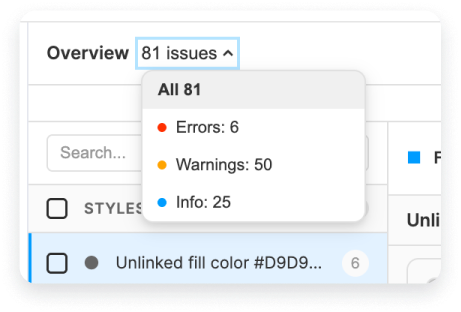 Start by resolving all `error` findings first -- they represent broken connections and hard violations. Then work through `warn` findings, which are the most common category. Treat `info` findings as cleanup opportunities.
## What "library-only" means
Some rules are marked **library-only** in the table below. These rules only produce findings when you scan a file that is published as a Figma library. They detect problems that only matter to library maintainers -- unused styles, hidden components, missing descriptions, and incomplete variables.
If you scan a regular design file, library-only rules silently return zero findings. You do not need to disable them manually. See [Library mode](/features/library-mode) for full details on how LintKit adapts when it detects a library file.
## Fix confidence
Every finding includes a **confidence level** that tells you how safe the suggested fix is. This determines whether LintKit shows a one-click **Apply Fix** button or provides manual instructions instead.
| Confidence | Label | What it means in practice | Example |
| ---------- | -------------------- | ------------------------------------------------------------------------------------------------------------- | --------------------------------------------------------------------------- |
| High | Auto-fixable | LintKit can safely fix this with one click. The change affects a single property and cannot break layout. | Snapping auto-layout padding from `13px` to `12px` |
| Medium | Review suggested fix | LintKit can apply a fix, but you should review the result. The change might affect layout or sizing. | Snapping a frame width from `157px` to `160px` -- could cause text clipping |
| Low | Manual fix required | LintKit provides instructions but no auto-fix button. Fixing requires moving layers or making judgment calls. | Adjusting manual gaps between layers that are not in auto layout |
Bulk fix ([Pro](/features/pricing)) processes all findings in a category at once. It only applies high-confidence fixes automatically and skips low-confidence findings.
## Rule categories
Orphaned fills, text, strokes, effects, grids. Plus duplicate and unused style detection.
Spacing scale, corner radii, stroke weight, fractional pixels, auto-layout suggestions, grid alignment, absolute positioning.
Hidden layers, empty frames, single-child groups, default names, forbidden patterns.
Unapproved libraries, broken instances, deep nesting, hidden components, missing descriptions.
WCAG contrast checking, broken variable references, variable completeness.
## Full rule table
| Rule | Category | Default | Severity | Description |
| ---------------------- | ------------- | --------- | -------- | ------------------------------------------------------------------------------------- |
| Orphaned Fills | Styles | On | `warn` | Solid fills not linked to a paint style or variable |
| Orphaned Text | Styles | On | `warn` | Text nodes without a text style |
| Orphaned Strokes | Styles | On | `warn` | Strokes not linked to a paint style or variable |
| Orphaned Effects | Styles | On | `warn` | Effects (shadow, blur) not using an effect style |
| Orphaned Grids | Styles | On | `info` | Layout grids without a grid style |
| Duplicate Styles | Styles | Off | `warn` | Near-identical styles detected via Delta E 2000 color science |
| Unused Styles | Styles | On | `info` | Local styles with zero usage on the current page library-only |
| Spacing Scale | Layout | Off | `warn` | Spacing values outside your configured scale |
| Corner Radii | Layout | Off | `warn` | Radius values outside your allowed set |
| Stroke Weight | Layout | On | `info` | Stroke widths outside your allowed set |
| Fractional Pixels | Layout | On | `info` | Non-integer x, y, width, or height values |
| Auto Layout Suggestion | Layout | On | `info` | Frames that could benefit from auto layout |
| Grid Alignment | Layout | Off | `info` | Nodes misaligned to column or row grids |
| Absolute Positioning | Layout | On | `warn` | Absolute-positioned layers inside auto-layout parents |
| Cleanup | Cleanup | On | `info` | Hidden layers, empty frames/groups, single-child groups |
| Layer Naming | Cleanup | On | `info` | Default names (Frame 1, Rectangle 47), forbidden patterns |
| Unapproved Libraries | Components | On | `error` | Instances from non-approved libraries |
| Components | Components | On | `warn` | Wrapper groups, local components, broken instances, local instances |
| Nested Components | Components | On | `info` | Excessive component nesting (depth > 4 warn, > 6 error) |
| Hidden Components | Components | On | `info` | Components hidden from publishing by dot or underscore prefix library-only |
| Missing Descriptions | Components | Off | `info` | Styles and components without descriptions library-only |
| Contrast | Accessibility | On | `warn` | Text/background contrast below WCAG AA or AAA |
| Broken Variables | Accessibility | Always on | `error` | Variable bindings pointing to deleted or renamed variables |
| Variable Completeness | Accessibility | On | `warn` | Missing mode values, broken aliases, missing descriptions library-only |
Rules marked **library-only** only produce findings when you scan a published library file.
## Where to start
Different teams have different priorities. Here is a recommended order for enabling rules based on your role.
Start with rules that catch handoff problems:
1. **Orphaned fills, text, strokes** -- the most common findings. These catch layers disconnected from your design system.
2. **Contrast** -- catches accessibility violations before code review.
3. **Cleanup** -- removes hidden layers and empty containers that confuse developers.
4. **Fractional pixels** -- prevents blurry rendering in production.
5. **Layer naming** -- stops "Frame 47" and "Rectangle copy 3" from reaching dev handoff.
Once comfortable, enable **Spacing scale** and **Corner radii** after configuring your design system values in **Settings**.
Start with library health rules:
1. **Unused styles** -- find styles no one is using so you can deprecate them.
2. **Duplicate styles** -- consolidate near-identical styles cluttering your library.
3. **Variable completeness** -- catch missing mode values and broken aliases before consumers hit them.
4. **Hidden components** -- check which components are hidden from publishing.
5. **Missing descriptions** -- ensure every style and component is documented for consumers.
6. **Nested components** -- identify performance bottlenecks from deep nesting.
Then enable **Unapproved libraries** with your `approvedLibraryKeys` to enforce library governance across your org.
Start with rules that are enabled by default and require no configuration:
1. **Cleanup** -- instant wins. Remove hidden layers, empty groups, and single-child wrappers.
2. **Orphaned fills and text** -- connect everything to styles.
3. **Fractional pixels** -- snap everything to the pixel grid.
4. **Auto layout suggestions** -- find frames that should use auto layout.
5. **Layer naming** -- rename "Frame 1" before anyone sees your file.
These rules work out of the box with zero configuration.
## Findings and fixes
Every finding includes:
* **A severity level** -- `info`, `warn`, or `error`
* **Affected nodes** -- click to select them on the canvas
* **A suggested fix** -- apply it with one click, or bulk-fix all instances ([Pro](/features/pricing))
Some findings offer **multiple fix options**. For example, an orphaned fill might suggest linking to an existing style, binding to a variable, or creating a new style.
Start by resolving all `error` findings first -- they represent broken connections and hard violations. Then work through `warn` findings, which are the most common category. Treat `info` findings as cleanup opportunities.
## What "library-only" means
Some rules are marked **library-only** in the table below. These rules only produce findings when you scan a file that is published as a Figma library. They detect problems that only matter to library maintainers -- unused styles, hidden components, missing descriptions, and incomplete variables.
If you scan a regular design file, library-only rules silently return zero findings. You do not need to disable them manually. See [Library mode](/features/library-mode) for full details on how LintKit adapts when it detects a library file.
## Fix confidence
Every finding includes a **confidence level** that tells you how safe the suggested fix is. This determines whether LintKit shows a one-click **Apply Fix** button or provides manual instructions instead.
| Confidence | Label | What it means in practice | Example |
| ---------- | -------------------- | ------------------------------------------------------------------------------------------------------------- | --------------------------------------------------------------------------- |
| High | Auto-fixable | LintKit can safely fix this with one click. The change affects a single property and cannot break layout. | Snapping auto-layout padding from `13px` to `12px` |
| Medium | Review suggested fix | LintKit can apply a fix, but you should review the result. The change might affect layout or sizing. | Snapping a frame width from `157px` to `160px` -- could cause text clipping |
| Low | Manual fix required | LintKit provides instructions but no auto-fix button. Fixing requires moving layers or making judgment calls. | Adjusting manual gaps between layers that are not in auto layout |
Bulk fix ([Pro](/features/pricing)) processes all findings in a category at once. It only applies high-confidence fixes automatically and skips low-confidence findings.
## Rule categories
Orphaned fills, text, strokes, effects, grids. Plus duplicate and unused style detection.
Spacing scale, corner radii, stroke weight, fractional pixels, auto-layout suggestions, grid alignment, absolute positioning.
Hidden layers, empty frames, single-child groups, default names, forbidden patterns.
Unapproved libraries, broken instances, deep nesting, hidden components, missing descriptions.
WCAG contrast checking, broken variable references, variable completeness.
## Full rule table
| Rule | Category | Default | Severity | Description |
| ---------------------- | ------------- | --------- | -------- | ------------------------------------------------------------------------------------- |
| Orphaned Fills | Styles | On | `warn` | Solid fills not linked to a paint style or variable |
| Orphaned Text | Styles | On | `warn` | Text nodes without a text style |
| Orphaned Strokes | Styles | On | `warn` | Strokes not linked to a paint style or variable |
| Orphaned Effects | Styles | On | `warn` | Effects (shadow, blur) not using an effect style |
| Orphaned Grids | Styles | On | `info` | Layout grids without a grid style |
| Duplicate Styles | Styles | Off | `warn` | Near-identical styles detected via Delta E 2000 color science |
| Unused Styles | Styles | On | `info` | Local styles with zero usage on the current page library-only |
| Spacing Scale | Layout | Off | `warn` | Spacing values outside your configured scale |
| Corner Radii | Layout | Off | `warn` | Radius values outside your allowed set |
| Stroke Weight | Layout | On | `info` | Stroke widths outside your allowed set |
| Fractional Pixels | Layout | On | `info` | Non-integer x, y, width, or height values |
| Auto Layout Suggestion | Layout | On | `info` | Frames that could benefit from auto layout |
| Grid Alignment | Layout | Off | `info` | Nodes misaligned to column or row grids |
| Absolute Positioning | Layout | On | `warn` | Absolute-positioned layers inside auto-layout parents |
| Cleanup | Cleanup | On | `info` | Hidden layers, empty frames/groups, single-child groups |
| Layer Naming | Cleanup | On | `info` | Default names (Frame 1, Rectangle 47), forbidden patterns |
| Unapproved Libraries | Components | On | `error` | Instances from non-approved libraries |
| Components | Components | On | `warn` | Wrapper groups, local components, broken instances, local instances |
| Nested Components | Components | On | `info` | Excessive component nesting (depth > 4 warn, > 6 error) |
| Hidden Components | Components | On | `info` | Components hidden from publishing by dot or underscore prefix library-only |
| Missing Descriptions | Components | Off | `info` | Styles and components without descriptions library-only |
| Contrast | Accessibility | On | `warn` | Text/background contrast below WCAG AA or AAA |
| Broken Variables | Accessibility | Always on | `error` | Variable bindings pointing to deleted or renamed variables |
| Variable Completeness | Accessibility | On | `warn` | Missing mode values, broken aliases, missing descriptions library-only |
Rules marked **library-only** only produce findings when you scan a published library file.
## Where to start
Different teams have different priorities. Here is a recommended order for enabling rules based on your role.
Start with rules that catch handoff problems:
1. **Orphaned fills, text, strokes** -- the most common findings. These catch layers disconnected from your design system.
2. **Contrast** -- catches accessibility violations before code review.
3. **Cleanup** -- removes hidden layers and empty containers that confuse developers.
4. **Fractional pixels** -- prevents blurry rendering in production.
5. **Layer naming** -- stops "Frame 47" and "Rectangle copy 3" from reaching dev handoff.
Once comfortable, enable **Spacing scale** and **Corner radii** after configuring your design system values in **Settings**.
Start with library health rules:
1. **Unused styles** -- find styles no one is using so you can deprecate them.
2. **Duplicate styles** -- consolidate near-identical styles cluttering your library.
3. **Variable completeness** -- catch missing mode values and broken aliases before consumers hit them.
4. **Hidden components** -- check which components are hidden from publishing.
5. **Missing descriptions** -- ensure every style and component is documented for consumers.
6. **Nested components** -- identify performance bottlenecks from deep nesting.
Then enable **Unapproved libraries** with your `approvedLibraryKeys` to enforce library governance across your org.
Start with rules that are enabled by default and require no configuration:
1. **Cleanup** -- instant wins. Remove hidden layers, empty groups, and single-child wrappers.
2. **Orphaned fills and text** -- connect everything to styles.
3. **Fractional pixels** -- snap everything to the pixel grid.
4. **Auto layout suggestions** -- find frames that should use auto layout.
5. **Layer naming** -- rename "Frame 1" before anyone sees your file.
These rules work out of the box with zero configuration.
## Findings and fixes
Every finding includes:
* **A severity level** -- `info`, `warn`, or `error`
* **Affected nodes** -- click to select them on the canvas
* **A suggested fix** -- apply it with one click, or bulk-fix all instances ([Pro](/features/pricing))
Some findings offer **multiple fix options**. For example, an orphaned fill might suggest linking to an existing style, binding to a variable, or creating a new style.