> ## Documentation Index
> Fetch the complete documentation index at: https://docs.lintkit.com/llms.txt
> Use this file to discover all available pages before exploring further.
# Accessibility rules
> WCAG contrast checking, broken variables, and variable health
Accessibility rules help you build designs that work for everyone and catch broken variable references that silently undermine your design system. The contrast rule catches WCAG violations before code review, while the variable rules ensure your design tokens remain connected and complete.
## Contrast
**Default:** On | **Severity:** `warn`
Checks text-to-background contrast ratios against WCAG standards. LintKit defaults to **WCAG AA**. You can switch to **AAA** for stricter requirements via `accessibility.wcagLevel` in **Settings**.
### What it detects
Text nodes where the contrast ratio between the text color and its detected background falls below WCAG requirements. For example:
> **Contrast failure** -- text `#9CA3AF` on background `#FFFFFF` has a contrast ratio of 2.9:1.
> Required: 4.5:1 (WCAG AA, normal text).
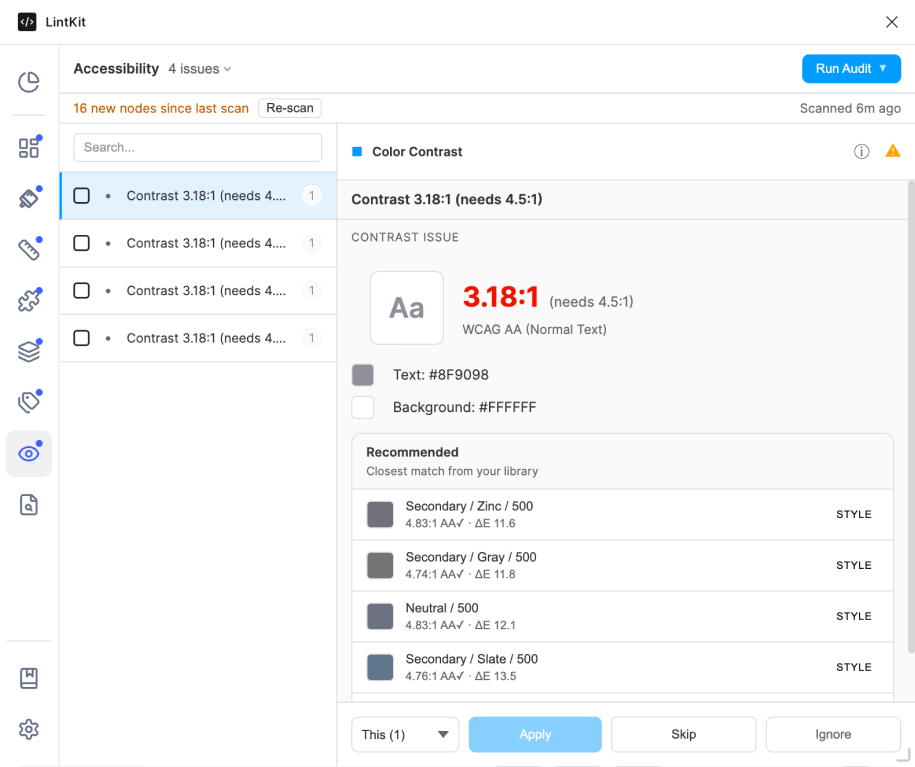 Findings are sorted by contrast ratio, **worst (lowest ratio) first**, so the most severe violations appear at the top.
### Required contrast ratios
| Level | Normal text | Large text |
| ---------------- | ----------- | ---------- |
| **AA** (default) | 4.5:1 | 3:1 |
| **AAA** | 7:1 | 4.5:1 |
**Large text** is defined as text that is 18pt (24px) or larger at regular weight, or 14pt (18.67px) or larger at bold weight (700+), per the WCAG specification. LintKit automatically determines whether text qualifies as large based on font size and inferred font weight.
### How background detection works
LintKit does not assume a white background. It uses three detection strategies in order, stopping at the first one that succeeds:
LintKit looks at sibling layers that are **lower in the layer order** (earlier children in the parent frame). It checks for overlapping, background-like shapes with solid fills. This catches cases where a rectangle or frame sits behind the text as a card background, banner, or section fill.
**Example:** A text layer `"Sign up"` sits on top of a rectangle with fill `#2563EB`. LintKit detects the rectangle as the background and checks contrast between the text color and `#2563EB`.
**Confidence:** High, because the sibling directly overlaps the text.
If no sibling background is found, LintKit walks up the layer tree and checks parent frame fills. This catches cases where the text sits inside a colored frame (like a navigation bar or sidebar).
**Example:** A text layer `"Dashboard"` is inside a frame with fill `#1E293B`. No sibling background exists, so LintKit uses the parent frame's fill as the background.
**Confidence:** High for direct parents; decreases for grandparents and beyond.
If neither siblings nor parents provide a solid fill, LintKit falls back to `accessibility.assumedBgColor` (default: `#FFFFFF`). This is a last resort for text floating on an artboard with no explicit background.
**Example:** A text layer sits directly on the canvas with no background element. LintKit assumes white (`#FFFFFF`) as the background.
**When to change:** If your design system uses a dark background by default (for example, a dark theme app), set `accessibility.assumedBgColor` to your default dark background color (like `#1E1E1E`) to get accurate contrast checks for text on the default background.
### When to enable it
Keep this rule on (it is the default) for all production design work. Accessibility compliance is both a legal requirement in many jurisdictions and a quality standard. Disable only for early exploration where color is not finalized.
Switch from AA to AAA (`accessibility.wcagLevel: 'AAA'`) if your organization requires the stricter standard, or if you are designing for users with low vision.
### How to fix findings
Each finding shows the text color, detected background color, current contrast ratio, and required ratio. Click the finding to select the text node on the canvas.
You have two options:
* **Darken the text** on a light background (or lighten on a dark background) until it meets the required ratio.
* **Change the background** to improve contrast.
After adjusting colors, re-scan to confirm the contrast ratio now passes. LintKit recalculates the ratio with the new colors.
When fixing contrast, aim for a ratio above the minimum rather than exactly at the threshold. A ratio of 5.0:1 provides a comfortable margin above the 4.5:1 AA requirement and accounts for slight color variations across screens.
### Configuration
| Key | Default | Description | Use case for adjusting |
| -------------------------------- | ----------- | -------------------------------------------------------- | -------------------------------------------------------------- |
| `accessibility.wcagLevel` | `'AA'` | WCAG conformance level | Set to `'AAA'` for stricter requirements (7:1 for normal text) |
| `accessibility.assumedBgColor` | `'#FFFFFF'` | Fallback background color when no background is detected | Set to your app's default background color if it is not white |
| `accessibility.checkMinTextSize` | `false` | Flag text below minimum size | Enable to catch text that is too small to read |
| `accessibility.minTextSize` | `12` | Minimum text size in pixels | Adjust based on your design system's minimum text size |
### Edge cases
* **Text without a determinable fill** is skipped (for example, text with no fill or gradient fills).
* **Font weight is inferred** from the font style name (for example, "Bold" maps to 700, "SemiBold" to 600, "Light" to 300). If the font uses non-standard weight names, the inference may be incorrect, which can affect the large text threshold.
* **Complex backgrounds** like gradients, images, or semi-transparent overlays are not fully supported. LintKit uses the first solid fill it finds, which may not represent the effective background.
* **Opacity compositing** is accounted for, but multi-layer compositing (for example, two semi-transparent overlapping backgrounds) may not be fully accurate.
***
## Broken Variables
**Default:** Always on | **Severity:** `error`
This rule always runs. It cannot be toggled off because broken variable references silently degrade your design system.
Detects variable bindings that point to deleted or renamed variables. These broken bindings are insidious -- the layer keeps its last resolved value and looks correct, but the design system connection is gone. Future variable updates will not propagate to these layers.
### What it detects
Any node property that is bound to a variable ID that no longer exists. For example:
> **Broken variable** -- `cornerRadius` on **Button/Primary** is bound to a deleted variable.
> Current value: `8px` (last resolved value). Variable reference is broken.
> **Broken variable** -- fill color on **Card/Default** is bound to a deleted variable.
> Current value: `#2563EB` (last resolved value). Variable reference is broken.
Findings are sorted by contrast ratio, **worst (lowest ratio) first**, so the most severe violations appear at the top.
### Required contrast ratios
| Level | Normal text | Large text |
| ---------------- | ----------- | ---------- |
| **AA** (default) | 4.5:1 | 3:1 |
| **AAA** | 7:1 | 4.5:1 |
**Large text** is defined as text that is 18pt (24px) or larger at regular weight, or 14pt (18.67px) or larger at bold weight (700+), per the WCAG specification. LintKit automatically determines whether text qualifies as large based on font size and inferred font weight.
### How background detection works
LintKit does not assume a white background. It uses three detection strategies in order, stopping at the first one that succeeds:
LintKit looks at sibling layers that are **lower in the layer order** (earlier children in the parent frame). It checks for overlapping, background-like shapes with solid fills. This catches cases where a rectangle or frame sits behind the text as a card background, banner, or section fill.
**Example:** A text layer `"Sign up"` sits on top of a rectangle with fill `#2563EB`. LintKit detects the rectangle as the background and checks contrast between the text color and `#2563EB`.
**Confidence:** High, because the sibling directly overlaps the text.
If no sibling background is found, LintKit walks up the layer tree and checks parent frame fills. This catches cases where the text sits inside a colored frame (like a navigation bar or sidebar).
**Example:** A text layer `"Dashboard"` is inside a frame with fill `#1E293B`. No sibling background exists, so LintKit uses the parent frame's fill as the background.
**Confidence:** High for direct parents; decreases for grandparents and beyond.
If neither siblings nor parents provide a solid fill, LintKit falls back to `accessibility.assumedBgColor` (default: `#FFFFFF`). This is a last resort for text floating on an artboard with no explicit background.
**Example:** A text layer sits directly on the canvas with no background element. LintKit assumes white (`#FFFFFF`) as the background.
**When to change:** If your design system uses a dark background by default (for example, a dark theme app), set `accessibility.assumedBgColor` to your default dark background color (like `#1E1E1E`) to get accurate contrast checks for text on the default background.
### When to enable it
Keep this rule on (it is the default) for all production design work. Accessibility compliance is both a legal requirement in many jurisdictions and a quality standard. Disable only for early exploration where color is not finalized.
Switch from AA to AAA (`accessibility.wcagLevel: 'AAA'`) if your organization requires the stricter standard, or if you are designing for users with low vision.
### How to fix findings
Each finding shows the text color, detected background color, current contrast ratio, and required ratio. Click the finding to select the text node on the canvas.
You have two options:
* **Darken the text** on a light background (or lighten on a dark background) until it meets the required ratio.
* **Change the background** to improve contrast.
After adjusting colors, re-scan to confirm the contrast ratio now passes. LintKit recalculates the ratio with the new colors.
When fixing contrast, aim for a ratio above the minimum rather than exactly at the threshold. A ratio of 5.0:1 provides a comfortable margin above the 4.5:1 AA requirement and accounts for slight color variations across screens.
### Configuration
| Key | Default | Description | Use case for adjusting |
| -------------------------------- | ----------- | -------------------------------------------------------- | -------------------------------------------------------------- |
| `accessibility.wcagLevel` | `'AA'` | WCAG conformance level | Set to `'AAA'` for stricter requirements (7:1 for normal text) |
| `accessibility.assumedBgColor` | `'#FFFFFF'` | Fallback background color when no background is detected | Set to your app's default background color if it is not white |
| `accessibility.checkMinTextSize` | `false` | Flag text below minimum size | Enable to catch text that is too small to read |
| `accessibility.minTextSize` | `12` | Minimum text size in pixels | Adjust based on your design system's minimum text size |
### Edge cases
* **Text without a determinable fill** is skipped (for example, text with no fill or gradient fills).
* **Font weight is inferred** from the font style name (for example, "Bold" maps to 700, "SemiBold" to 600, "Light" to 300). If the font uses non-standard weight names, the inference may be incorrect, which can affect the large text threshold.
* **Complex backgrounds** like gradients, images, or semi-transparent overlays are not fully supported. LintKit uses the first solid fill it finds, which may not represent the effective background.
* **Opacity compositing** is accounted for, but multi-layer compositing (for example, two semi-transparent overlapping backgrounds) may not be fully accurate.
***
## Broken Variables
**Default:** Always on | **Severity:** `error`
This rule always runs. It cannot be toggled off because broken variable references silently degrade your design system.
Detects variable bindings that point to deleted or renamed variables. These broken bindings are insidious -- the layer keeps its last resolved value and looks correct, but the design system connection is gone. Future variable updates will not propagate to these layers.
### What it detects
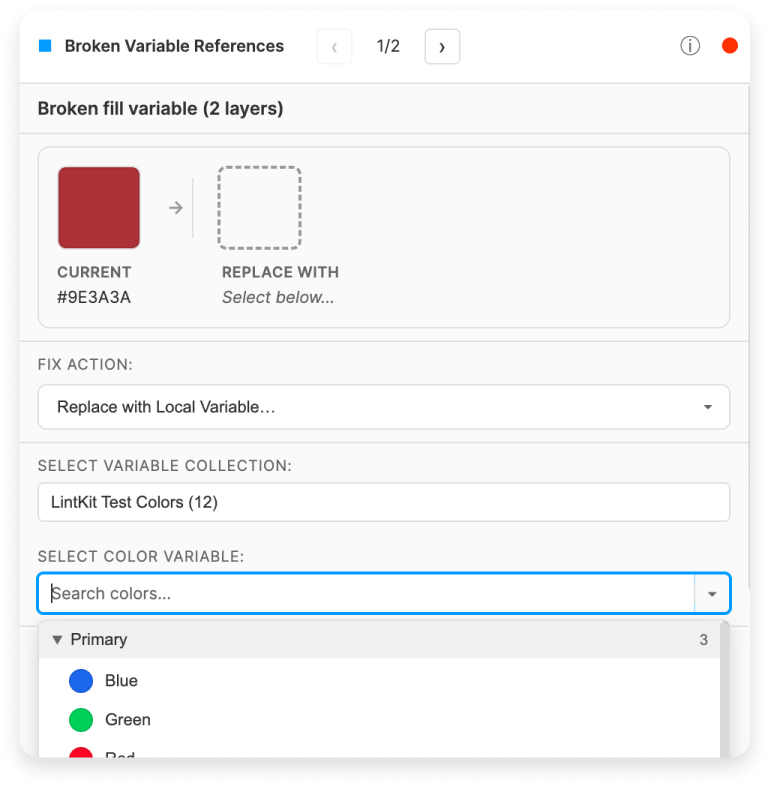
Any node property that is bound to a variable ID that no longer exists. For example:
> **Broken variable** -- `cornerRadius` on **Button/Primary** is bound to a deleted variable.
> Current value: `8px` (last resolved value). Variable reference is broken.
> **Broken variable** -- fill color on **Card/Default** is bound to a deleted variable.
> Current value: `#2563EB` (last resolved value). Variable reference is broken.
 ### What causes broken variable references
Broken references typically happen when:
1. **A variable is deleted** from the library. All consumers that reference it keep their last value but lose the connection.
2. **A variable is renamed** in a way that changes its ID. Figma's variable IDs are stable across renames, but some operations (like recreating a variable) generate a new ID.
3. **A library is removed** from the file. All variable bindings from that library become broken.
4. **A variable collection is restructured.** Moving variables between collections can change their IDs.
### How to prevent broken references
* Deprecate variables before deleting them (mark with a description like "DEPRECATED: use X instead").
* Use the Variable Completeness rule in your library to catch broken aliases before they propagate.
* Re-scan consumer files after library restructuring.
### What gets checked
LintKit validates bindings across all property types that support variables:
| Property group | Properties checked |
| -------------- | ------------------------------------------------------------------------------------------------- |
| Fills | Color bindings on solid fills |
| Strokes | Color bindings on solid strokes |
| Effects | Color bindings on drop shadows and inner shadows |
| Layout | `paddingTop`, `paddingRight`, `paddingBottom`, `paddingLeft`, `itemSpacing`, `counterAxisSpacing` |
| Shape | `cornerRadius`, `strokeWeight` |
### How to fix findings
The finding shows the current resolved value (the last value before the variable was deleted). Use this to determine which variable should be reconnected.
* Click **Apply Fix** to detach the broken binding. The layer keeps its current resolved value as a hardcoded value.
* After detaching, manually rebind to the correct variable if a replacement exists.
### Edge cases
LintKit caches variable validity results during each scan. If the same variable ID is referenced by 100 layers, it is validated once and the result is reused. The cache is cleared at the start of each scan run.
***
## Variable Completeness
**Default:** On | **Severity:** varies by sub-check
This rule only produces findings in library files. [Learn more about library-only rules.](/features/pricing)
Checks that your variable collections are healthy, complete, and documented. Incomplete variables cause unpredictable behavior for consumers of your library when they switch modes or reference your variables.
### What it detects
This rule runs three sub-checks, each with a different severity:
**Severity:** `warn`
For multi-mode variable collections (for example, Light mode and Dark mode), checks each variable for undefined or null values in any mode.
**Example scenario:** You create a `Surface/Primary` color variable with Light mode set to `#FFFFFF` but forget to define the Dark mode value. When consumers switch to Dark mode, the variable resolves to undefined and Figma falls back to a default (often black), breaking the design.
**Example finding:**
> **Missing mode value** -- `Surface/Primary` has no value defined for **Dark** mode.
**How to fix:** Open the variable collection in Figma and define the missing mode value. There is no auto-fix because the correct value requires design judgment.
**Severity:** `error`
Detects variables that alias other variables which have been deleted. This is the variable equivalent of a broken symlink.
**Example scenario:** `Text/Primary` is set to alias `Palette/Gray-900` in Light mode. Someone deletes `Palette/Gray-900` from the collection. Now `Text/Primary` has a broken alias that will not resolve correctly.
**Example finding:**
> **Broken alias** -- `Text/Primary` (Light mode) aliases a variable that no longer exists.
LintKit first checks the local variable index (fast O(1) lookup), then falls back to an async check for remote variables to ensure accuracy.
**How to fix:** Open the variable collection and update the alias to point to an existing variable, or replace it with a direct value.
**Severity:** `info`
Detects variables with no documentation. Descriptions help consumers understand when and how to use each variable.
**Example scenario:** Your library has 200 color variables but none have descriptions. Consumers cannot tell the difference between `Surface/Primary` and `Surface/Secondary` without checking the values manually.
**Example finding:**
> **Missing description** -- variable `Surface/Primary` has no description.
**How to fix:** Click **Apply Fix** to auto-generate a description from the variable name. For more useful documentation, write a custom description that explains **when to use** the variable (for example, "Primary surface color for card and page backgrounds").
### When to enable it
Enable when maintaining a library with variable collections, especially multi-mode collections. This rule is on by default but only produces findings in library files.
### Edge cases
* LintKit pre-fetches all local variables at scan start and indexes them by ID for O(1) lookup. This avoids slow individual async calls per variable.
* For alias validation, local variables are checked first (instant). Only if the alias target is not found locally does LintKit fall back to an async remote variable check.
* This rule only runs in library mode (`ctx.isLibraryMode`). It silently returns zero findings in regular design files.
### What causes broken variable references
Broken references typically happen when:
1. **A variable is deleted** from the library. All consumers that reference it keep their last value but lose the connection.
2. **A variable is renamed** in a way that changes its ID. Figma's variable IDs are stable across renames, but some operations (like recreating a variable) generate a new ID.
3. **A library is removed** from the file. All variable bindings from that library become broken.
4. **A variable collection is restructured.** Moving variables between collections can change their IDs.
### How to prevent broken references
* Deprecate variables before deleting them (mark with a description like "DEPRECATED: use X instead").
* Use the Variable Completeness rule in your library to catch broken aliases before they propagate.
* Re-scan consumer files after library restructuring.
### What gets checked
LintKit validates bindings across all property types that support variables:
| Property group | Properties checked |
| -------------- | ------------------------------------------------------------------------------------------------- |
| Fills | Color bindings on solid fills |
| Strokes | Color bindings on solid strokes |
| Effects | Color bindings on drop shadows and inner shadows |
| Layout | `paddingTop`, `paddingRight`, `paddingBottom`, `paddingLeft`, `itemSpacing`, `counterAxisSpacing` |
| Shape | `cornerRadius`, `strokeWeight` |
### How to fix findings
The finding shows the current resolved value (the last value before the variable was deleted). Use this to determine which variable should be reconnected.
* Click **Apply Fix** to detach the broken binding. The layer keeps its current resolved value as a hardcoded value.
* After detaching, manually rebind to the correct variable if a replacement exists.
### Edge cases
LintKit caches variable validity results during each scan. If the same variable ID is referenced by 100 layers, it is validated once and the result is reused. The cache is cleared at the start of each scan run.
***
## Variable Completeness
**Default:** On | **Severity:** varies by sub-check
This rule only produces findings in library files. [Learn more about library-only rules.](/features/pricing)
Checks that your variable collections are healthy, complete, and documented. Incomplete variables cause unpredictable behavior for consumers of your library when they switch modes or reference your variables.
### What it detects
This rule runs three sub-checks, each with a different severity:
**Severity:** `warn`
For multi-mode variable collections (for example, Light mode and Dark mode), checks each variable for undefined or null values in any mode.
**Example scenario:** You create a `Surface/Primary` color variable with Light mode set to `#FFFFFF` but forget to define the Dark mode value. When consumers switch to Dark mode, the variable resolves to undefined and Figma falls back to a default (often black), breaking the design.
**Example finding:**
> **Missing mode value** -- `Surface/Primary` has no value defined for **Dark** mode.
**How to fix:** Open the variable collection in Figma and define the missing mode value. There is no auto-fix because the correct value requires design judgment.
**Severity:** `error`
Detects variables that alias other variables which have been deleted. This is the variable equivalent of a broken symlink.
**Example scenario:** `Text/Primary` is set to alias `Palette/Gray-900` in Light mode. Someone deletes `Palette/Gray-900` from the collection. Now `Text/Primary` has a broken alias that will not resolve correctly.
**Example finding:**
> **Broken alias** -- `Text/Primary` (Light mode) aliases a variable that no longer exists.
LintKit first checks the local variable index (fast O(1) lookup), then falls back to an async check for remote variables to ensure accuracy.
**How to fix:** Open the variable collection and update the alias to point to an existing variable, or replace it with a direct value.
**Severity:** `info`
Detects variables with no documentation. Descriptions help consumers understand when and how to use each variable.
**Example scenario:** Your library has 200 color variables but none have descriptions. Consumers cannot tell the difference between `Surface/Primary` and `Surface/Secondary` without checking the values manually.
**Example finding:**
> **Missing description** -- variable `Surface/Primary` has no description.
**How to fix:** Click **Apply Fix** to auto-generate a description from the variable name. For more useful documentation, write a custom description that explains **when to use** the variable (for example, "Primary surface color for card and page backgrounds").
### When to enable it
Enable when maintaining a library with variable collections, especially multi-mode collections. This rule is on by default but only produces findings in library files.
### Edge cases
* LintKit pre-fetches all local variables at scan start and indexes them by ID for O(1) lookup. This avoids slow individual async calls per variable.
* For alias validation, local variables are checked first (instant). Only if the alias target is not found locally does LintKit fall back to an async remote variable check.
* This rule only runs in library mode (`ctx.isLibraryMode`). It silently returns zero findings in regular design files.